

Remove Oxidation from Marine Electrical Terminals

Table of Contents
- Identify Oxidation Type and Severity on Marine Electrical Terminals
- Prepare Your Workspace and Isolate Power Safely
-
How to Clean Oxidized Electrical Connectors Step by Step
- Step 1: Photograph and assess before you touch anything
- Step 2: Remove loose corrosion with the right abrasive for the metal
- Step 3: Match the chemical to the terminal material
- Step 4: Flush and remove all residue
- Step 5: Dry completely before reassembly
- Step 6: Inspect and decide clean vs. replace
- Step 7: Protect and reassemble in reverse order
- Electrical Contact Cleaner for Marine Connectors: Choosing the Right Product
- Test Electrical Continuity and Connection Reliability After Cleaning
- When to Replace Corroded Electrical Connectors Instead of Cleaning
- Marine Electrical Corrosion Prevention for Long-Term Protection
- Conclusion
- Frequently Asked Questions
Last Updated: October 18, 2026
Identify Oxidation Type and Severity on Marine Electrical Terminals
Oxidation on marine electrical terminals comes in different forms, and identifying the type helps you choose the right cleaning approach. The most common sign is discoloration around battery posts, cable lugs, and connectors. This guide covers how to remove oxidation marine electrical terminals and restore reliable connections. Consistent maintenance routines involving cleaning battery terminals prevent the buildup of corrosive deposits that often plague similar high-amperage systems found in golf cart battery terminals.
Green or white corrosion signals copper oxidation
Green or white crusty buildup on copper or tinned copper terminals indicates copper oxidation, caused by moisture and saltwater reacting with the metal.
You'll see this most often on battery posts, cable lugs, and connector pins in the engine compartment. The corrosion layer insulates and increases contact resistance, even a thin green layer can cause starting problems or navigation failures.
Brown or black deposits indicate surface corrosion
Brown or black deposits usually form on steel or iron components, or on silver-plated terminals that have lost their coating. Black oxidation on silver terminals is common because saltwater and humidity strip the plating over time.
Brown rust on steel means oxygen and moisture are attacking the base metal. Unlike green copper oxidation, it spreads faster if untreated, and the metal weakens as rust deepens.
Prepare Your Workspace and Isolate Power Safely
Before touching any electrical terminals, disconnect power completely. Turn off the battery disconnect switch, remove the negative battery cable first, then the positive cable.
Work in a clean, dry, well-lit area and gather supplies first: wire brushes, contact cleaner, clean rags, and a dry towel.
Wear safety glasses and gloves, contact cleaner and oxidation particles can irritate skin and eyes.
How to Clean Oxidized Electrical Connectors Step by Step
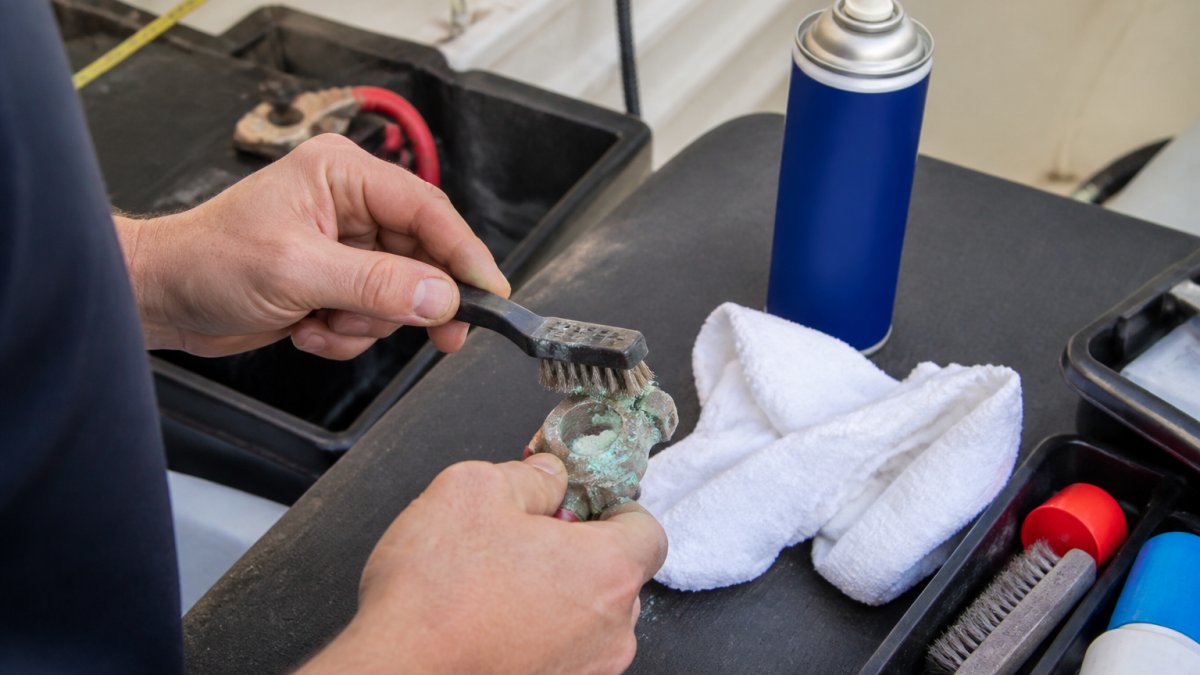
Follow this sequence in order every time so you do not skip isolation, residue removal, or protection. The steps assume power is off and the negative cable is disconnected.
Step 1: Photograph and assess before you touch anything
Photograph the terminal and wiring before cleaning as a baseline and to spot corrosion that returns. Note color, location, and extent: green crust points to copper oxidation, white powder often indicates acid seepage or advanced copper breakdown, and black film on silver plating means the plating is failing. Deep pitting, cracked connector bodies, or corrosion inside a crimp barrel means skip to replacement, cleaning will not restore structural integrity.
Step 2: Remove loose corrosion with the right abrasive for the metal
Start dry. Use a brass-bristle brush on tinned copper, brass, and silver-plated contacts; brass is softer than steel and won't gouge plating as aggressively. Use nylon on gold-plated pins and thin plating. Reserve stainless-steel brushes for bare steel and iron only, steel particles embed in copper and start a new galvanic cell.
Step 3: Match the chemical to the terminal material
Spray marine-grade electrical contact cleaner onto the terminal and let it dwell 30 seconds to dissolve salt residue and lift oxidation. Material matters:
- Bare copper and tinned copper: Most marine contact cleaners are safe. Avoid strong acids and ammonia-based cleaners, which attack copper and leave residues that trap moisture.
- Brass: Solvent-based contact cleaners are fine. Avoid prolonged soaking in acidic cleaners, which can dezincify the surface and leave a pink, porous layer.
- Aluminum: Use a cleaner labeled safe for aluminum. Many general-purpose contact cleaners contain chlorinated solvents that can pit aluminum; check the label before spraying.
After the dwell time, scrub with a small brush or old toothbrush, reaching into connector slots and around lug edges. Spray again, wipe with a dry rag, and repeat until bright, three or four applications is normal for heavy corrosion.
Step 4: Flush and remove all residue
Residue is the most common reason corrosion returns within weeks. After the final scrub, flush with fresh contact cleaner or isopropyl alcohol to carry away loosened particles and spent solvent, holding a rag underneath to catch runoff. Pay attention to the gap between lug and post and the inside of ring terminals, where particles collect and hold moisture.
Step 5: Dry completely before reassembly
Use a lint-free rag and compressed air if you have it. Every surface must be dry, including connector slots, under lug edges, and inside crimp barrels, any moisture restarts oxidation once energized. Leaving moisture trapped under the lug produces the green ring that returns a month later.
Step 6: Inspect and decide clean vs. replace
With the terminal dry and bright, inspect under good light for pitting, cracks, heat marks, and loose strands at the lug. If the metal is sound and plating intact, proceed to protection. If pitted, plating gone, or the lug is loose, replace the terminal or cable assembly rather than protecting a compromised connection.
Step 7: Protect and reassemble in reverse order
Apply a thin film, not a blob, of dielectric grease or corrosion-inhibitor spray to the clean metal; excess grease attracts dirt and can interfere with contact between mating surfaces. Reconnect the positive cable first, then negative, and torque hardware to the manufacturer's specification. Overtightening stretches the post or crushes the lug; undertightening leaves a high-resistance joint that heats under load.
Electrical Contact Cleaner for Marine Connectors: Choosing the Right Product
Not all contact cleaners work equally well on marine terminals. The best products for electrical contact cleaner for marine connectors are formulated to handle saltwater corrosion and moisture.
Look for cleaners labeled "marine-grade" or designed for saltwater environments; they dissolve salt deposits and oxidation better than standard cleaners and dry quickly with minimal residue.
Isopropyl alcohol dissolves oxidation and evaporates fast. Water-displacing sprays push moisture away and prevent new corrosion right after cleaning.
Check the label to confirm it's safe for your terminal materials.
Store contact cleaner in a cool, dry place, away from heat and sparks, these products are flammable.
Test Electrical Continuity and Connection Reliability After Cleaning
Cleaning is only finished when you've proven the connection carries current under load. A continuity beep tells you almost nothing, a corroded joint can show continuity and still fail when a starter draws hundreds of amps. Use these checks in order.
Visual and mechanical check first
Before picking up a meter, look at the connection under bright light: uniformly bright metal, no green or white film, no pitting, no discoloration at the lug-to-cable joint. Try to twist the lug on the post, it should not move; a lug that rotates by hand is loose and will heat under load.
Continuity and resistance check
Set your multimeter to the lowest ohms range or continuity mode. Touch one probe to the battery post and the other to the cable lug, not the wire strands. A good connection reads at or near the meter's lead resistance, typically under 0.1 ohm. If higher, clean again or check torque.
Voltage-drop test under load, the check that matters
A voltage-drop test measures voltage lost across the connection while current flows, the standard way to find a high-resistance joint a static ohms reading misses.
- Set the multimeter to DC volts on the lowest range that covers your expected drop (usually 2 V or 20 V).
- Connect one probe to the battery post and the other to the cable lug on the same connection.
- Have a helper crank the engine, or turn on the high-current load the circuit serves (starter, windlass, thruster, inverter).
- Read the meter while the load is applied.
A healthy connection shows a very small drop, commonly a few hundredths of a volt on a starting circuit. A reading of a few tenths of a volt or more across a single connection indicates resistance that will heat and eventually fail.
Load test the equipment the circuit serves
Start the engine and listen for normal cranking speed. A slow crank or solenoid click after cleaning means the connection is still resistive or the battery itself is weak. Turn on the navigation equipment, chartplotter, radios, and lighting one at a time and watch for dimming, dropouts, or equipment that will not power on.
Monitor for recurrence
Check the terminals again after the first trip and again after a week. Corrosion that returns to the same spot within days points to a moisture path, a leaking hatch, a spray source, or a bilge that stays wet, rather than a cleaning failure. Fix the moisture source and reapply protective coating; cleaning alone will not stop it.
When to Replace Corroded Electrical Connectors Instead of Cleaning
Sometimes cleaning isn't enough. If corrosion has eaten deeply into the terminal material or the connector body is cracked or pitted, replacement is safer than cleaning.
Look for these signs that replacement is needed:
- Deep pitting or erosion in the terminal surface that won't polish out
- Cracks or splits in the connector body
- Corrosion that returns within days of cleaning
A corroded terminal that's barely holding on is a fire hazard.
Replacement connectors are inexpensive compared to the cost of electrical fires or engine failure at sea. If you're unsure whether cleaning will work, replace the terminal.
Marine Electrical Corrosion Prevention for Long-Term Protection
Preventing corrosion is far easier than cleaning it repeatedly.
Improve ventilation in your engine compartment. Stagnant, humid air accelerates corrosion.
Inspect terminals regularly. Check battery posts and major connectors monthly during boating season.
Keep terminals dry. Wipe down battery posts and connectors after rain or saltwater exposure.
Use tinned copper or silver-plated terminals. These materials resist corrosion better than bare copper.
Conclusion
Corroded marine electrical terminals reduce power delivery, cause starting problems, and create fire hazards.
Most corrosion can be removed when you remove oxidation marine electrical terminals with a wire brush, marine contact cleaner, and dielectric grease.
At Charleston Yachting, we stock premium marine connectors, cable lugs, and protective products from trusted brands like Garmin and Harken to keep your electrical system running reliably.
Frequently Asked Questions
How do you remove green corrosion from electrical connectors?
Green corrosion on electrical connectors is copper oxidation. Disconnect power, then use a wire brush to remove loose deposits. Apply electrical contact cleaner rated for marine use, scrub gently with a soft brush, and dry thoroughly with a clean cloth. For stubborn buildup, use fine sandpaper or a polishing tool. Finish by applying a corrosion inhibitor spray to prevent it from returning.
Can you use isopropyl alcohol to clean corroded battery terminals?
Yes, isopropyl alcohol is effective for cleaning corroded battery terminals and electrical contacts. It evaporates quickly and leaves no residue. Use 90% or higher concentration, apply with a brush or cloth, and scrub the oxidized areas. Dry the terminals immediately afterward. However, dedicated electrical contact cleaners formulated for marine environments often work faster and provide additional corrosion protection.
When should a corroded marine electrical terminal be replaced instead of cleaned?
Replace a corroded electrical connector if the corrosion has eaten through the plating, the terminal is pitted or structurally damaged, cleaning does not restore electrical continuity, or the connector shows cracks or breaks. Severe corrosion reduces contact reliability and creates fire hazards. If a terminal fails a continuity test after cleaning, replacement is safer than repeated repairs.
How can you prevent corrosion from returning on boat electrical connections?
After cleaning, apply a dielectric grease or corrosion inhibitor spray to all terminals and connectors. Ensure all connections are tight and waterproof. Use tinned copper or silver-plated terminals, which resist oxidation better than bare copper. Keep battery cables dry and inspect connections monthly, especially in saltwater or humid environments. Ventilation around electrical panels reduces moisture buildup.