

Prevent Saltwater Corrosion: Electronics Protection Guide

Table of Contents
- Why Saltwater Corrosion Damages Marine Electronics
- How to Prevent Saltwater Corrosion: Core Protection Methods
- Best Corrosion Inhibitor for Marine Electronics
- Marine Electronics Maintenance Schedule
- How to Clean Salt Off Electronics
- DIY vs. Professional Repair for Corroded Electronics
- Post-Exposure Emergency Protocol
- Protecting Screens and Displays from Salt Damage
- Frequently Asked Questions
Last Updated: September 1, 2026
Why Saltwater Corrosion Damages Marine Electronics
Saltwater is a conductor. When it contacts exposed metal connectors, circuit boards, and wiring harnesses, it completes electrical circuits that shouldn't exist. The result is galvanic corrosion, a chemical reaction that eats through metal faster than freshwater ever could.
The damage compounds quickly. Salt residue left on terminals creates a conductive path for stray currents. Oxidation accelerates. Within weeks of saltwater exposure, corroded connector pins stop transmitting reliable signals (peer-reviewed research). Navigation systems flicker. Communication equipment fails mid-voyage. A $3,000 Garmin chartplotter becomes a paperweight.
What makes saltwater corrosion so destructive is that it works invisibly. You don't see the damage until the electronics stop functioning. By then, the corrosion has already penetrated deep into connector pins and circuit board traces. Prevention isn't optional for anyone operating near coastal waters, it's the difference between a functioning vessel and a floating repair bill.
How to Prevent Saltwater Corrosion: Core Protection Methods
The best approach to preventing saltwater corrosion combines three layers of defense: barrier protection, regular maintenance, and environmental sealing. Each layer addresses a different vulnerability. Together, they keep salt away from the metal surfaces where damage begins.
Dielectric Grease Application on Connectors
Dielectric grease is a non-conductive, hydrophobic compound that blocks moisture and salt from reaching connector pins and terminal surfaces (ieee.org). It doesn't conduct electricity, so it won't interfere with signal transmission. What it does is create a physical barrier that repels saltwater and prevents oxidation on the contact surfaces.
Application is straightforward but requires precision. Start with clean, dry connectors. Any salt residue or moisture already present will be trapped under the grease, accelerating corrosion. Use a small brush or applicator to coat the connector pins, terminal block surfaces, and ribbon cable connectors with a thin, even layer. The goal is complete coverage without excess buildup, which can trap debris.
Pay special attention to the spaces between pins. Salt spray doesn't just coat the top surface, it infiltrates the gaps where corrosion inhibitor protection is needed most. Work the grease into these crevices. For connectors that see frequent connection and disconnection, reapply dielectric grease every 6-12 months, depending on exposure intensity.
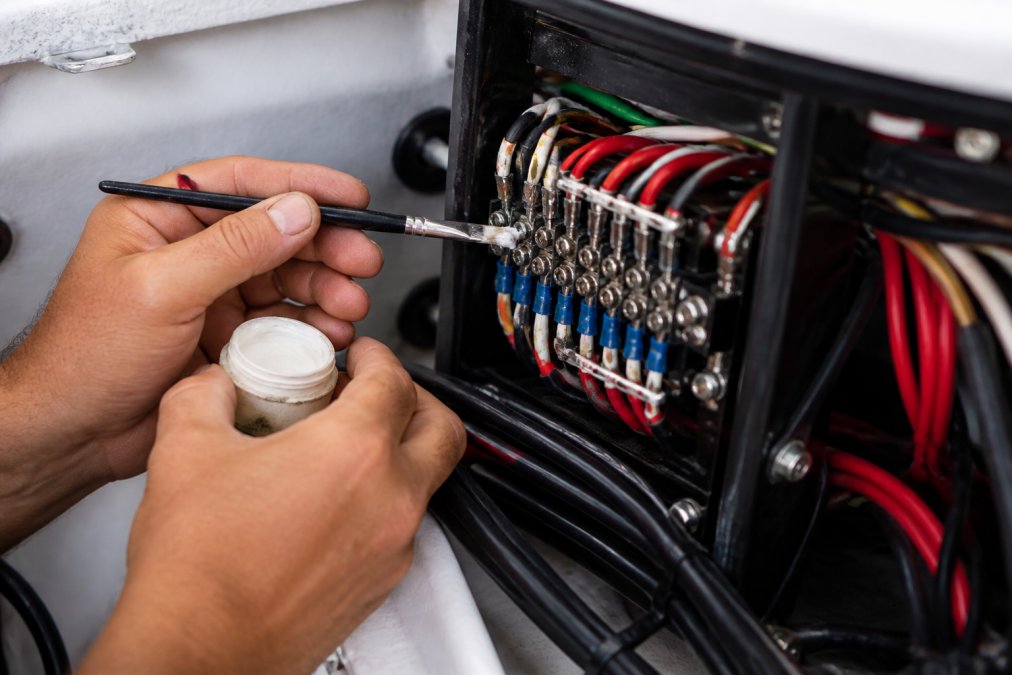
A common mistake is using the wrong lubricant. Standard silicone-based greases can degrade under UV exposure (astm.org). Marine-grade dielectric grease is formulated to withstand saltwater spray, UV radiation, and temperature swings without breaking down. It's a small detail that separates temporary protection from lasting results.
Environmental Sealing and Protective Coatings
Beyond dielectric grease, environmental sealing creates a second barrier at the system level. Conformal coating, a thin, protective sealant applied to circuit boards, prevents saltwater from reaching PCB traces and component leads. It's not a DIY application; professional-grade conformal coatings require proper equipment and curing conditions. But for electronics exposed to heavy salt spray, it's worth the investment.
For connectors and wiring harnesses, shrink tubing and silicone-based sealant provide mechanical protection. Wrap exposed ribbon cables with marine-grade heat shrink tubing to shield them from salt spray. Seal connector housings with silicone sealant to prevent saltwater intrusion into the connector body itself. This approach is labor-intensive but highly effective for high-value systems.
The key is choosing materials rated for marine use. Standard electrical tape deteriorates in saltwater. Marine-grade sealants are formulated to remain flexible and water-resistant in the harsh saltwater environment. They don't crack or peel as UV exposure and temperature changes occur.
Freshwater Rinsing Procedures
Freshwater rinsing removes salt residue before it has time to cause damage. The timing matters. Rinse electronics and connectors as soon as possible after saltwater exposure. If you've been operating in heavy spray or docked in a saltwater environment, a freshwater rinse should be part of your routine.
Use low-pressure freshwater only. High-pressure spray can force water into sealed connectors and push salt deeper into crevices. A gentle rinse with a hose or spray bottle works better. Focus on connectors, terminal blocks, and any visible salt buildup. Pay special attention to areas where wiring harnesses meet connectors, salt accumulates there.
After rinsing, dry everything thoroughly. Water left on electronics is almost as bad as salt. Use compressed air or a soft cloth to remove excess moisture. Allow time for complete air drying before powering systems back on. This prevents corrosion from moisture trapped under components.
Best Corrosion Inhibitor for Marine Electronics
The best corrosion inhibitor for marine electronics depends on your specific setup and exposure level. For most recreational sailors, dielectric grease combined with regular freshwater rinsing handles the job. For commercial operators or vessels in extreme saltwater environments, conformal coating adds an extra layer of insurance.
Dielectric grease remains the industry standard because it's non-conductive, easy to apply, and effective across many marine conditions. It works on connectors, terminal blocks, and wiring harnesses. It's compatible with all common marine electronics brands, including Garmin, B&G, and Furuno systems.
For electronics that experience constant saltwater spray, marine-grade corrosion inhibitor sprays offer additional protection. These are applied to exposed metal surfaces and dry to form a thin protective film. They're useful for rigging hardware, antenna bases, and other external components where dielectric grease isn't practical.
Charleston Yachting stocks protective accessories designed to work alongside corrosion inhibitors. Suncovers for navigation displays, like the [Raymarine Black Suncover f/i50, i60, i70, i70s, p70 p70s (eS/AXIOM style) [R70663]](https://charlestonyachting.com/products/raymarine-black-suncover-f-i50-i60-i70-i70s-p70-p70s-es-axiom-style-r70663) and Furuno Suncover f/TZT12F [100-430-901-10] options, reduce UV exposure and protect screens from salt spray when equipment isn't in use. A suncover on your Garmin or B&G display significantly extends its lifespan by preventing both UV damage and saltwater intrusion.
![Raymarine Black Suncover f/i50, i60, i70, i70s, p70 p70s (eS/AXIOM style) [R70663]](https://cdn.shopify.com/s/files/1/0842/4914/9751/files/106617XL.jpg?v=1775849307)
![Furuno Suncover f/TZT12F [100-430-901-10]](https://cdn.shopify.com/s/files/1/0842/4914/9751/files/88913XL.jpg?v=1775846996)
Marine Electronics Maintenance Schedule
Preventing saltwater corrosion requires consistency, not heroic effort. A structured maintenance schedule keeps corrosion at bay without consuming excessive time.
Monthly: Inspect connectors and visible wiring for salt buildup. Rinse with freshwater if you've been in heavy spray or docked in saltwater. Reapply dielectric grease to frequently connected and disconnected connectors.
Quarterly: Perform a more thorough inspection of all external connectors and terminal blocks. Check for white or blue-green oxidation, early signs of corrosion. Rinse and dry all electronics. Reapply protective coatings where needed.
Annually: Deep clean all connectors. Disconnect systems if possible, remove corrosion inhibitor, clean with electrical contact cleaner, and reapply fresh dielectric grease. Inspect wiring harnesses for damage or salt intrusion. Check conformal coatings for cracks or deterioration.
After Heavy Saltwater Exposure: Don't wait for the monthly schedule. Rinse electronics immediately after heavy spray, salt-laden storms, or extended time in harsh conditions. Corrosion accelerates when salt dries on metal surfaces. Quick action prevents permanent damage.
The maintenance schedule adapts to your environment. If you're moored in a saltwater location year-round, increase inspection frequency to bi-weekly. If you operate primarily in freshwater with occasional coastal trips, monthly checks are sufficient.
How to Clean Salt Off Electronics
Salt removal requires care. Aggressive cleaning can damage delicate electronics. The goal is to remove salt residue without introducing new damage.
Start with freshwater rinses. Use low-pressure spray or a spray bottle, never high-pressure washers. Rinse thoroughly, paying attention to connector gaps and crevices where salt accumulates. Let water drain completely before moving to the next step.
For stubborn salt buildup, electrical contact cleaner works well. Spray it onto a soft brush or cloth, then gently scrub affected areas. Contact cleaner evaporates quickly and doesn't leave residue. Avoid getting it inside sealed connectors or on PCB components unless you're performing a full system teardown.
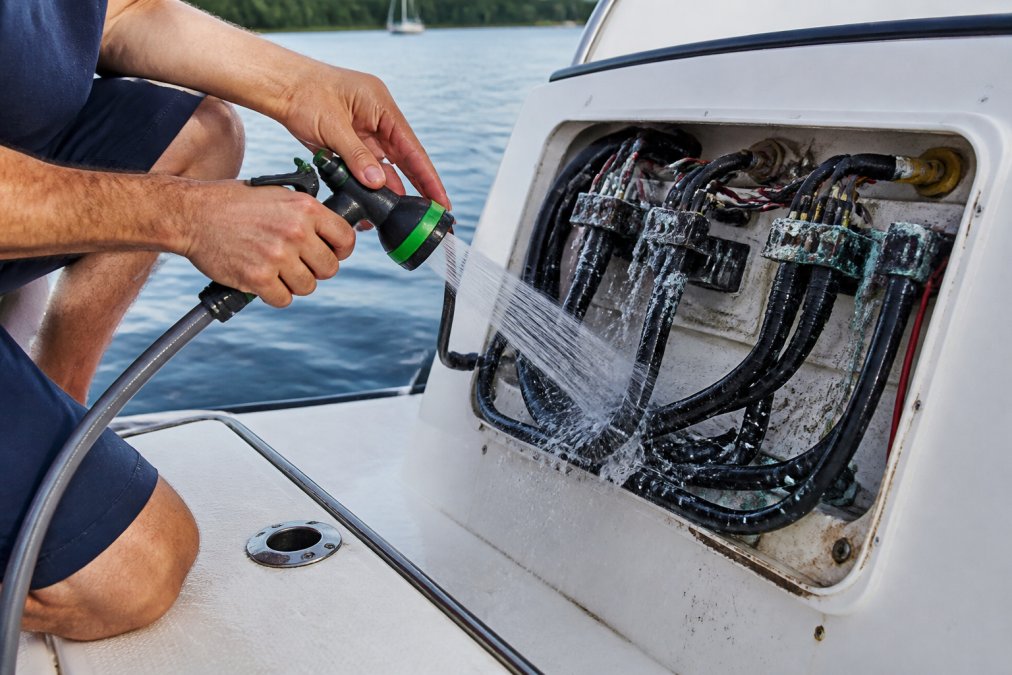
After cleaning, dry thoroughly. Compressed air is ideal for blowing water out of connector gaps. Follow with a soft cloth to remove remaining moisture. Allow complete air drying before reconnecting systems or powering equipment back on.
Never use abrasive materials or aggressive scrubbing. Connector pins are fragile. Scratching gold plating or breaking pins creates new corrosion pathways. If corrosion is severe, deep pitting or extensive white oxidation, professional cleaning or component replacement is safer than DIY attempts.
DIY vs. Professional Repair for Corroded Electronics
Light corrosion on connectors and terminal blocks is manageable as a DIY project. You have the tools: freshwater, soft brushes, electrical contact cleaner, and dielectric grease. The risk is low because you're working on the exterior surfaces where mistakes don't cascade into system failures.
Heavy corrosion, deep pitting, extensive oxidation, or corrosion that's penetrated into connector bodies, requires professional attention. Attempting to clean severely corroded connectors risks breaking pins or damaging internal contacts. Replacement is often safer and more reliable than repair.
The cost calculation matters. A corroded Garmin connector might cost $50 to replace versus $200 for professional cleaning and repair. If DIY cleaning restores function, you've saved money and downtime. If it fails, you're back where you started, now with a damaged connector that's harder to repair.
For systems like B&G integrated displays or Furuno multifunction displays, professional repair is the better choice. These systems have complex internal electronics where corrosion damage extends beyond visible connector corrosion. Professionals have the diagnostic tools to identify hidden damage and the replacement parts to restore full functionality.
Post-Exposure Emergency Protocol
If you've experienced heavy saltwater exposure, a wave over the helm, extended spray in rough conditions, or accidental submersion, immediate action prevents catastrophic damage.
First 30 minutes: Power down all electronics. Don't test them to see if they still work. Active current flowing through corroded circuits accelerates oxidation. Shut everything off.
30 minutes to 2 hours: Rinse all exposed electronics and connectors with freshwater. Work quickly but carefully. Don't disassemble anything yet. Focus on removing visible salt residue.
2 to 6 hours: Allow electronics to dry completely. Use compressed air and soft cloths to remove water. Don't power anything back on until you're certain everything is dry.
6 to 24 hours: Inspect connectors closely. Look for white, blue-green, or brown oxidation. If corrosion is visible, don't power systems on. Contact a professional or proceed with careful cleaning using electrical contact cleaner and soft brushes.
After 24 hours: If no visible corrosion is present and everything is completely dry, power systems back on carefully. Monitor for anomalies, flickering displays, intermittent signals, or unusual readings. These indicate hidden corrosion damage that requires professional attention.
The key is patience. Rushing to restore power after saltwater exposure is the fastest way to turn a repairable corrosion problem into permanent equipment failure. A few hours of careful drying and inspection saves thousands in replacement costs.
Protecting Screens and Displays from Salt Damage
Navigation displays, Garmin chartplotters, B&G multifunction displays, Furuno radar screens, are expensive and vulnerable to saltwater damage. The screen itself can be protected; the electronics behind it are harder to save once salt intrusion begins.
Suncovers are the first line of defense. They shield screens from UV exposure, salt spray, and physical damage when equipment isn't in use. The Raymarine Black Suncover f/i50, i60, i70, i70s, p70 p70s (eS/AXIOM style) [R70663], designed for i50, i60, i70, and p70 series displays, costs $27.99 and provides reliable protection for extended periods at the dock. For larger displays like the [Furuno Suncover f/FAP7011C - Grey [001-647-940-00]](https://charlestonyachting.com/products/furuno-suncover-f-fap7011c-grey-001-647-940-00) at $57.00 offers custom-fit protection.
![Furuno Suncover f/FAP7011C - Grey [001-647-940-00]](https://cdn.shopify.com/s/files/1/0842/4914/9751/files/105453XL.jpg?v=1775849117)
Beyond suncovers, protective sealant around display bezels prevents saltwater from creeping into the display housing. Most marine electronics have sealed connectors on the back, but the front bezel can be vulnerable. Apply marine-grade silicone sealant around the edges where the display meets the mounting bracket. This prevents salt spray from working its way into the display internals.
For displays mounted in exposed helm stations, consider a protective canopy or bimini top that shields electronics from direct spray. This reduces salt exposure significantly and extends the lifespan of all exposed equipment.
Regular rinsing of display screens with freshwater keeps salt residue from building up. Use a soft, lint-free cloth dampened with freshwater, never spray directly on the screen. Dry immediately to prevent water spots and corrosion around the bezel.
Saltwater corrosion isn't an inevitable part of boat ownership. It's preventable through consistent maintenance and the right protective products. At Charleston Yachting, we understand that marine electronics represent a significant investment. Our curated selection of protective accessories, including suncovers from Raymarine and Furuno, helps you protect that investment. Start with dielectric grease on connectors, add environmental sealing where needed, and commit to regular freshwater rinsing. Combined with quality protective equipment and a structured maintenance schedule, you'll keep your navigation systems, communication gear, and electrical systems functioning reliably for years. Shop protective accessories and marine electronics at Charleston Yachting today and secure your vessel's performance with same-day shipping on premium gear.
Frequently Asked Questions
Does salt water corrode electronics?
Yes. Saltwater intrusion causes galvanic corrosion on connector pins, terminal blocks, and circuit board traces. Salt buildup accelerates oxidation and electrolytic reactions that break down electrical conductivity. Even brief exposure can initiate corrosion; extended exposure without protection will render electronics non-functional within months. Preventative maintenance and protective barriers are essential for any electronics operating in marine environments.
What is the best corrosion inhibitor for marine electronics?
Dielectric grease is the industry standard for marine electronics protection. It creates a moisture barrier around connector surfaces and prevents saltwater intrusion while maintaining electrical conductivity. Apply it to all connector pins, terminal blocks, and exposed metal contacts. For additional protection, conformal coatings and silicone-based sealants provide hydrophobic barriers on PCBs and ribbon cables. Always verify product compatibility with your specific equipment before application.
How often should I inspect and maintain marine electronics?
Conduct visual inspections monthly during boating season, checking for salt buildup on connectors and terminal blocks. Perform a thorough freshwater rinse and maintenance every three months or after heavy saltwater exposure. Annual deep maintenance should include removing connector covers, reapplying dielectric grease, checking for corrosion on contact surfaces, and testing electrical conductivity. Boats in high-salt environments may need more frequent schedules.
Can I use dielectric grease on all marine electronics?
Dielectric grease works on most connectors, terminal blocks, and wiring harnesses, but check your equipment manufacturer's guidelines first. It is safe for Garmin, B&G, Furuno, and Raymarine systems. Avoid applying it to areas where grease could interfere with mechanical moving parts or optical sensors. For sensitive PCB areas, use conformal coating instead. Always test on a small area first if you are unsure about compatibility.
This article was written using GrandRanker