

Marine Wind Sensor Installation for Sailboats: A Step-by-Step Guide

Quick Summary
Marine wind sensor installation on a sailboat means mounting an instrument at the masthead, aligning it to the boat's centerline, and connecting it to your display network. Confirm compatibility with your chartplotter first, then choose a wired sensor for larger boats or a wireless one for easier retrofits.
- Masthead mounting gives the cleanest airflow and the most accurate readings.
- Align the sensor with the boat's centerline, or it will show a steady error on every tack.
- Check that your display network and sensor share a compatible standard before buying.
- Never climb the mast alone; use a secured halyard, a proper harness, and a second person on deck.
- Verify readings after installation by comparing apparent wind angle against a known reference.
Table of Contents
Wireless or Wired: Choosing the Right Wind Sensor for Your Sailboat
Most sailboat owners upgrade their wind instruments because the old sensor has stopped giving reliable readings. Charleston Yachting stocks wind sensors from Raymarine, Garmin, and B&G, so you can compare wired and wireless options before you commit. The right choice depends on your boat's layout, your budget, and how much work you want to do on the mast.
A wired sensor runs a cable from the masthead to your instrument network. It is usually the more stable option for larger boats. A wireless sensor skips the long cable run and sends data by radio, which makes it easier to fit on smaller boats or older hulls where running cable is difficult.
- Wired sensors: Steady signal, cable run needed, best for larger boats and permanent installs
- Wireless sensors: No cable through the mast, quicker to fit, best for smaller boats and retrofits
- Both types: Output apparent wind angle and speed to a compatible display or chartplotter
For a wired option, the Raymarine RSW Wired Smart Performance Wind Transducer with a 30-meter cable is a common choice. For a wireless setup, the BG WS320 Wireless Wind Sensor is built for cruising and club racing. If you want a Garmin-compatible path, the Garmin gWind Transducer with a GND 10 black box bridge lets Nexus sail equipment work with Garmin chartplotters.


Watch out: A wireless sensor still needs a power source and a reliable wireless link. Check the battery or charging plan before you mount it aloft.
Sailboat Wind Sensor Mounting Location: Masthead, Bimini, or Stern
Where you mount the sensor matters as much as which sensor you buy. The masthead is a common location because it sits above much of the turbulence from the sails, the rigging, and the deck.
Bimini and stern mounts are sometimes used on small boats or when a masthead install is not practical. These locations are easier to reach, but the sensor sits in disturbed air.
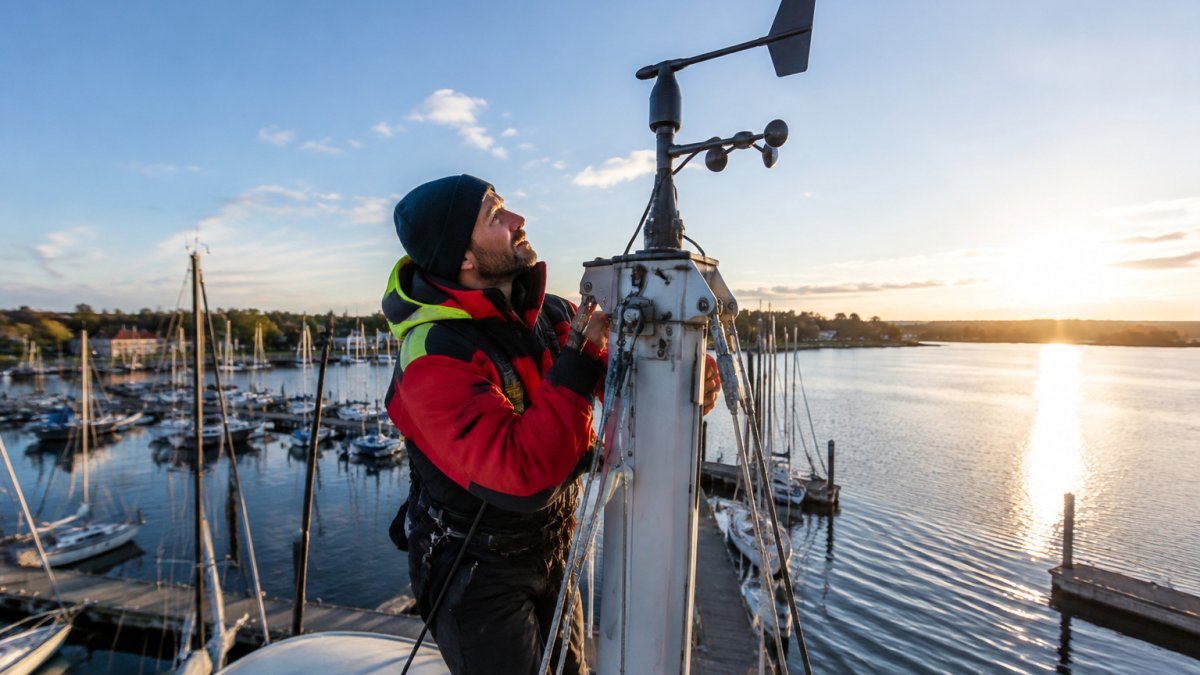
- Masthead: Cleanest airflow, most accurate, requires mast access
- Bimini: Easier access, moderate accuracy, can be affected by the canvas
- Stern: Simplest to reach, least accurate, mainly for small or temporary setups
Orientation counts too. Align the sensor so its reference point matches your boat's centerline, as the manufacturer's manual describes. A sensor that is even a few degrees off will report a steady error on every tack.
Compatibility Checks Before You Buy
Before you order a sensor, confirm that it will talk to your existing network. Many buyers assume every sensor works with every display, and that assumption causes most failed installs. Check your chartplotter or instrument display model and whether it uses NMEA 2000 or a proprietary network.
Raymarine, Garmin, and B&G products each have their own network standards, so mixing brands sometimes needs a bridge device. The Garmin GND 10 black box bridge, for example, lets Garmin chartplotters and Nexus sensors share NMEA 2000 data. The Raymarine i60 Wind Display System with a masthead wind vane transducer is a good example of a complete display-and-sensor package if you are starting from scratch.

- Identify your display brand and model
- Confirm whether your network is NMEA 2000, SeaTalkng, or another standard
- Check whether a bridge device is needed
- Confirm the sensor's cable length or wireless range fits your mast
Safety First: Working Aloft and Mast Access
Installing a masthead sensor means working aloft, which is the highest-risk part of this job. Never climb the mast alone, and never climb without a secured halyard, a proper harness, and a second person on deck watching the lines. A bosun's chair hoisted by a winch is safer than free climbing, but it still needs a competent person handling the winch.
Garmin gWind Transducer w/GND 10 Black Box Bridge [010-01227-00] →
Check your equipment before you go up. Inspect the halyard, shackles, and harness for wear, and make sure the mast steps or track are sound. Wind speed matters too. Wait for calm conditions, because a sensor install in gusty weather puts you at real risk of falling.
Watch out: Tighten all mast-top fittings after the first sail. Vibration can loosen connectors, and a loose sensor cable can fail at the worst moment.
Step-by-Step Marine Wind Sensor Installation
Use this sequence as a general guide, then follow your specific sensor's manual, since wiring details vary by model.
- Turn off power to the instrument network at the breaker.
- Route the sensor cable from the deck to the masthead, using existing mast wiring where possible.
- Mount the sensor on the masthead bracket, aligned with the boat's centerline.
- Connect the cable to the network backbone or the wireless gateway as the manual directs.
- Power up the network and confirm the display shows wind data.
- Secure all cable runs and check the connectors for a tight fit.
Plan for a half-day or longer install if you are running new cable. Wireless installs are usually faster but still require mast access.
Wind Sensor Calibration and Post-Installation Checks
After the install, verify the readings before you trust them. Motor or sail in a steady breeze and compare the apparent wind angle against a known reference, such as a telltale on the shrouds. Most displays let you apply a small offset to correct a consistent error.
Recheck the readings after your first few sails. If speed or angle drifts, look first at the connections and the mounting alignment.
Marine Wind Sensor Installation Cost and Your Next Step
The sensor cost depends on the model you choose. Charleston Yachting lists the Garmin gWind Transducer with GND 10 Black Box Bridge at $629.99, the Raymarine i60 Wind Display System w/Masthead Wind Vane Transducer at $1,099.99, the Raymarine RSW Wired Smart Performance Wind Transducer - Short Arm w/30M Cable at $934.99, and the BG WS320 Wireless Wind Sensor Only at $705.99. Add the cost of bridge devices, cable, and any professional labor you hire.
If you are ready to choose, start with the compatibility check above, then pick the sensor that fits your mast and network. Browse the full range of wind instruments at Charleston Yachting to find the right match for your boat.
Frequently Asked Questions
Where should a wind sensor be mounted on a sailboat?
Most sailboats mount the wind sensor at the masthead, the highest point where airflow is least disturbed by the sails, rigging, and deck structures. Placement should be clear of the mainsail's airflow and aligned with the boat's centerline so the reference direction is accurate. On boats without a suitable masthead position, a bimini or stern pole mount can work, though readings may be affected by nearby obstructions. Check the manufacturer's installation guide for the minimum clearance and alignment requirements for your specific model.
How much does it cost to install a wind sensor on a sailboat?
The sensor itself is the largest expense. Charleston Yachting lists the Garmin gWind Transducer w/GND 10 Black Box Bridge at $629.99, the Raymarine RSW Wired Smart Performance Wind Transducer - Short Arm w/30M Cable at $934.99, the B&G WS320 Wireless Wind Sensor Only at $705.99, and the Raymarine i60 Wind Display System w/Masthead Wind Vane Transducer at $1,099.99. Installation labor, mast access, and any additional cable or connectors will add to the total, and those costs depend on your boat and local rates.
Can a sailboat wind sensor be installed without running wires through the mast?
Yes. A wireless sensor such as the B&G WS320 eliminates the masthead cable run, which simplifies installation on boats where internal wiring is difficult to route. Wireless sensors still need a power source and a connection to your instrument network, typically through a receiver or gateway at the display. Confirm that your existing instruments support the wireless protocol before buying.
How do you calibrate a sailboat wind sensor after installation?
Start by confirming the sensor is aligned to the boat's centerline and that the reference direction matches your instrument setup. Compare the displayed apparent wind angle and speed against a known reference, such as a wind indicator or the readings from a previously calibrated sensor, across several points of sail. Follow the calibration procedure in your manufacturer's manual, which may use a configuration application over USB or the network, and recheck readings once the boat is underway in steady breeze.
