

How to Install a Marine VHF Radio With Built-In AIS?

Last Updated: October 27, 2026
Quick Summary
To install a marine VHF radio with built-in AIS, mount the radio where its display is visible, wire power through a fused circuit, and connect one antenna or separate VHF and AIS antennas through a splitter. Then connect it to your chartplotter over NMEA 2000 or NMEA 0183, and test that the radio transmits your position.
- Confirm the radio transmits as well as receives, since only a transmitter makes your vessel visible to others.
- Mount the antenna as high as practical, because height above water matters more than antenna gain for AIS range.
- Use an external splitter only with radios that expect one, and confirm compatibility and power needs first.
- Terminate the NMEA 2000 backbone with exactly one terminator at each end, never more or fewer.
- After wiring, confirm the chartplotter sees the radio, the GPS has a fix, and AIS targets appear on the chart.
Table of Contents
- What Built-In AIS Does in a Marine VHF Radio
- Tools, Parts, and Pre-Installation Checklist
- Antenna Setup and VHF AIS Antenna Splitter Installation
- Power Supply and Marine VHF Radio Wiring Diagram
- Connecting Your VHF AIS to a Chartplotter Over NMEA 2000
- Setting Your MMSI and Completing AIS MMSI Registration
- Testing AIS Transmission and Your Next Step With Charleston Yachting
- Frequently Asked Questions
What Built-In AIS Does in a Marine VHF Radio
A marine VHF radio with built-in AIS can receive and transmit your vessel's position to nearby ships.
AIS stands for Automatic Identification System. It sends a short data message with your position, course, and speed to other AIS-equipped boats and shore stations.
Garmin's Signal VHF 400 is one example. Its listing describes built-in AIS transmit and receive capability, showing range, course, speed, and crossing situation of other AIS-equipped vessels.
AIS Receiver Versus AIS Transponder
These terms are often confused, and the difference affects what you can do on the water.
An AIS receiver only listens.
An AIS transponder listens and transmits, sending your vessel's identity and position so other ships and shore stations can see you.
Some radios combine both functions. Icom's IC-M510 EVO, for example, lists an integrated AIS receiver in its description.
Tools, Parts, and Pre-Installation Checklist
Gather everything in one place before you start.
- Cable crimping tool and a wire stripper rated for marine-grade wire
- Multimeter for checking voltage and continuity
- Drill, bits, and sealant suitable for marine use
Before you drill or cut anything, confirm these points:
- Your MMSI number, or confirm you have a registration process underway
- Mounting location that keeps the display visible and the antenna clear of obstructions
- Power source that matches the radio's voltage requirements
A common mistake is buying the radio before mapping the cable runs. Measure first. Knowing where every cable goes prevents surprises halfway through.
Antenna Setup and VHF AIS Antenna Splitter Installation
A radio with built-in AIS must get both voice and AIS data through an antenna system.
Option one: internal splitter. Some radios, like the em-trak X100, include a VHF/AIS splitter inside the chassis, so one antenna feed serves both functions.
Option three: dedicated AIS antenna. Some installers run a separate, shorter AIS antenna and leave the VHF antenna dedicated to voice.
Matching the Antenna to the Job
AIS on VHF operates in the marine band around 156-162 MHz, and the antenna you choose should be rated for that band. A few practical points that separate a working install from a marginal one:
- Height beats gain for line-of-sight. AIS range is largely a function of antenna height above water. A 3 dB gain antenna at the top of a mast will usually outperform a 6 dB antenna on the cabin roof, because the horizon is the limit, not the antenna.
- Gain is not free. Higher-gain antennas flatten the radiation pattern, which helps at long range but can leave you deaf to close-aboard traffic in a chop. For AIS, a moderate-gain antenna mounted high is the usual compromise.
- Cable loss matters as much as antenna gain. Thin RG-58 loses more signal per foot than RG-8X or LMR-400. On a long mast run, the cable can eat more signal than the antenna adds. Use the manufacturer's recommended cable type and keep the run as short as the layout allows.
Route the antenna cable with gentle bends, no sharp kinks, and away from heat sources, moving parts, and other transmitting antennas. Mount the antenna as high as practical with a clear view of the horizon, at least a meter from any other antenna where the layout allows. Cheap coaxial cable to save a few dollars is a common mistake; weak cable drops signal strength and shortens your effective AIS range, defeating the purpose of the upgrade.
The table below summarises the three main antenna options for a radio with built-in AIS.
| Option | Best for | Key difference |
|---|---|---|
| Internal splitter | One cable run and one antenna | Locked to the manufacturer's splitter; no easy second AIS antenna later |
| External splitter | Radios with separate VHF and AIS ports | Add-on unit; SPL2000 is powered |
| Dedicated AIS antenna | Keeping an existing VHF antenna undisturbed | Avoids splitter loss; needs a second cable run and mount |
Power Supply and Marine VHF Radio Wiring Diagram
Power and wiring come next. Fixed-mount marine radios draw power from your boat's DC system, so confirm the required voltage in the manufacturer's manual before connecting anything.
A typical installation follows this sequence:
Garmin Signal VHF 400 Marine VHF Radio w/Built-In AIS Transponder [010-02951-00] →
- Turn off the main power switch at the battery.
- Run the power cable from a fused circuit to the radio location.
- Connect the positive and negative leads to the radio's power input.
- Add an inline fuse at the battery end of the positive cable.
- Restore power and verify the display lights up.
Keep the wiring neat: use a cable loom to bundle wires and label both ends of every cable. When you finish, check continuity and voltage with the multimeter before reconnecting the battery.
Wiring Diagram Basics
A wiring diagram shows how each wire connects. Look for these elements in the diagram supplied with your radio:
- Power leads, usually red for positive and black for negative
- Antenna connection for VHF and AIS
- Data connection to the NMEA 2000 backbone or NMEA 0183 port
Follow the diagram exactly. Mixing up leads can damage the radio or create a fire risk.
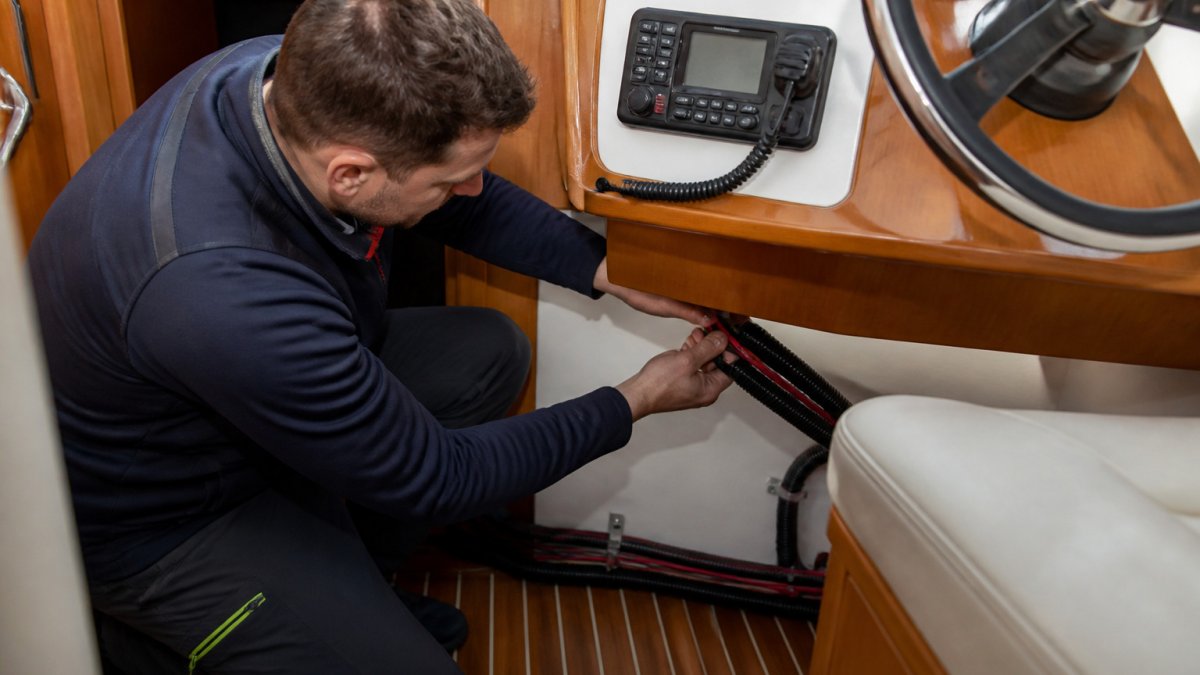
!A sailor kneeling in a boat cabin at a helm station, carefully routing a cable behind a fixed-mount marine radio with a tidy wire loom
Connecting Your VHF AIS to a Chartplotter Over NMEA 2000
Connecting the radio to a chartplotter turns AIS from a small screen on the radio into targets overlaid on your navigation chart. Most modern boats use NMEA 2000, a plug-and-play network standard; older boats may use NMEA 0183, and some installs use both. Know which one your chartplotter supports before you run cable.
NMEA 2000: The Backbone, Drop Cables, and Termination
NMEA 2000 is a powered, terminated bus. Every device taps into a backbone through a T-connector and a short drop cable. The rules that matter for a reliable install:
- Identify the backbone. It is the thick cable running between T-connectors, usually with a terminator at each end. If your boat does not have one, you will build a small backbone for the radio and chartplotter.
- Add a T-connector where the radio will tap in. Do not cut the backbone to insert a device; use a T.
- Run a drop cable from the T to the radio's NMEA 2000 port. Keep drops short, the standard limits drop length, and long drops are a common cause of intermittent devices.
- Confirm termination. The backbone needs exactly one terminator at each end, and no more. A missing terminator or an extra one will disrupt every device on the network, not just the radio.
- Check network power. NMEA 2000 provides power to the bus. Confirm the network is powered and that the radio's load is within the network's capacity before you add it.
- Power on and verify. The chartplotter should list the radio as a device and begin showing AIS targets once the radio has a GPS fix and is receiving AIS traffic.
You will need a NMEA 2000 T-connector and a drop cable sized for your layout; a multi-port T or small backbone kit is the usual way to add one device to an existing network. Garmin's Signal VHF 400 supports chartplotter integration through NMEA 2000 and Garmin's BlueNet Network, and Icom's IC-M510 EVO lists NMEA 2000 connectivity and can send GNSS position, AIS information, and DSC call data to other equipment.
NMEA 0183: When Your Chartplotter Is Older
If your chartplotter predates NMEA 2000 or only exposes 0183 ports, wire the radio's 0183 output to the chartplotter's 0183 input. Details vary by model, but the pattern is consistent:
- Match the talker to the listener. The radio's AIS output (often labeled AIS out or TX) goes to the chartplotter's AIS input (RX).
- Match the baud rate. AIS data on 0183 typically runs at 38,400 baud, while some other sentences run at 4,800. Set the chartplotter port to match the radio's AIS output.
- Share a common ground between the two devices, and keep the 0183 wiring away from power cables to reduce interference.
- Check the sentence set. Confirm the radio outputs the AIS sentences your chartplotter expects; most modern units do, but older plotters can be picky.
Some radios support both NMEA 2000 and NMEA 0183, so you can use 2000 for the chartplotter and 0183 for a second device, or fall back to 0183 if the 2000 network is full. Read the manual for exact port labels and baud settings before terminating anything.
A Quick Commissioning Check
After wiring, power the network and confirm three things in order: the chartplotter sees the radio as a device, the radio has a GPS fix, and AIS targets appear on the chart. If targets are missing, check termination and drop cables first, then confirm the chartplotter's AIS input is enabled and set to the correct baud rate. If the radio appears but shows no targets, suspect the antenna or splitter next.
Setting Your MMSI and Completing AIS MMSI Registration
The Garmin Signal VHF 400 and em-trak X100 listings state that programming by a qualified technician requires a copy of the MMSI Registration or FCC Ship Station License and the vessel master or owner's signed programming form at purchase.
Once the radio is programmed, confirm the following:
- The MMSI on the radio matches your registration exactly
- Your vessel name and call sign are entered correctly
- DSC functions show your correct identity when tested
Testing AIS Transmission and Your Next Step With Charleston Yachting
After installation, test the system before you rely on it. Start with the basics, then move to AIS.
- Turn on the radio and confirm the display and audio work on a working channel.
- Check the GPS fix on the radio or chartplotter.
- Confirm the AIS receiver shows nearby vessels on the screen.
- Verify that your vessel is transmitting, using your MMSI and the AIS status on the radio.
- Check that the chartplotter shows AIS targets with correct positions.
If something is wrong, go back to the basics: loose connections, reversed power leads, a faulty antenna cable, or a missing terminator on the NMEA 2000 network.
When you are ready to upgrade, Charleston Yachting offers the Garmin Signal VHF 400 with built-in AIS transmit and receive capability for $1,499.99, and the Icom IC-M510 EVO with an integrated AIS receiver and NMEA 2000 connectivity for $949.95.
Last Updated: October 27, 2026
Frequently Asked Questions
Does AIS need its own antenna?
The Garmin Signal VHF 400 listing states that its VHF/DSC/AIS features require a single VHF antenna. The em-trak X100 listing describes an integrated zero-loss VHF antenna splitter and states that one antenna is required for AIS and VHF.
How do you connect a VHF radio with AIS to a chartplotter?
The Garmin Signal VHF 400 listing states that chartplotter integration is available through the NMEA 2000 network and Garmin BlueNet Network.
How do I register my marine VHF radio and AIS?
The Garmin Signal VHF 400 and em-trak X100 listings state that programming by a qualified technician requires a copy of the MMSI Registration or FCC Ship Station License and the vessel master or owner's signed programming form at purchase.
How do you test AIS transmission after installation?
After wiring and programming, confirm the radio receives AIS targets and that other vessels can see your position. Check that GPS data appears on the radio and chartplotter, verify that nearby AIS targets populate the display, and make a short test call on a low-traffic channel. If targets do not appear, recheck antenna connections, the network power supply and the MMSI setting before retesting.
