

Best Marine Electronics Networking Cables

Table of Contents
- What Are Marine Electronics Networking Cables?
- NMEA 2000 vs Ethernet Marine Networking: Which System Is Right for Your Boat?
-
Top Marine Electronics Networking Cable Options
- 1. Garmin NMEA 2000 Backbone Cables: Flexible Lengths for Any Installation
- 2. Digital Yacht NMEA 2000 Starter Cable Kit: Complete System for New Installations
- 3. Garmin BlueNet Network Cables: High-Speed Ethernet for Modern Electronics
- 4. Garmin Marine Network Cables (RJ45): Standard Ethernet with Marine Protection
- 5. Raymarine SeaTalkng Backbone and Spur Cables: Integrated Power and Data
- Marine-Grade Ethernet Cable Installation: Setup and Best Practices
- Waterproof Connectors and Corrosion Resistance
- Proprietary vs. Universal Marine Networking Standards
- Cable Maintenance and Troubleshooting Network Connectivity
- Conclusion
Last Updated: August 26, 2026
What Are Marine Electronics Networking Cables?
Marine electronics networking cables allow your boat's navigation systems, sensors, and displays to communicate with each other. Unlike standard computer cables, they're engineered to withstand saltwater corrosion, UV exposure, temperature fluctuations, and vessel vibration. The cable jacket, connectors, and internal conductors must resist the harsh marine environment while maintaining reliable data transfer and power delivery.
A corroded connection can drop your entire network offline mid-voyage. The best marine electronics networking cables combine shielding to prevent electromagnetic interference, twisted pair conductors for signal integrity, and marine-grade connectors designed to seal out moisture and salt spray.
Two primary standards dominate modern marine installations: NMEA 2000 (a proprietary backbone system carrying both data and power) and Ethernet-based networks like Garmin's BlueNet (which deliver higher bandwidth for modern MFDs, fishfinders, and radar systems).
![Garmin NMEA 2000 Backbone Cable (2M) [010-11076-00]](https://cdn.shopify.com/s/files/1/0842/4914/9751/files/31891XL.jpg?v=1775841772)
NMEA 2000 vs Ethernet Marine Networking: Which System Is Right for Your Boat?
The choice between NMEA 2000 and Ethernet-based marine networking depends on your vessel's age, the electronics you're integrating, and whether you need future-proofing for advanced features. NMEA 2000 has dominated recreational boating for two decades, it's proven, widely supported, and handles core tasks of connecting chartplotters, autopilots, and sensors. Ethernet networks offer significantly higher data transfer speeds and are becoming standard on newer vessels and professional installations.
![Digital Yacht NMEA 2000 Starter Cable Kit [ZDIGN2KIT]](https://cdn.shopify.com/s/files/1/0842/4914/9751/files/67952XL.jpg?v=1775844545)
NMEA 2000 Backbone and Drop Cable Systems
NMEA 2000 uses a daisy-chain architecture where a single backbone cable runs through the boat, and individual devices connect via spur cables to T-pieces along the backbone. The backbone carries both power (12V) and data simultaneously, simplifying installation compared to separate power and data lines. The system uses proprietary Micro C connectors with metal housings that resist corrosion better than standard connectors.
You select backbone cable length based on your boat's layout, common lengths are 6 meters (20 feet), 4 meters (13 feet), or 2 meters (6 feet), then route it from your main breaker panel along the cabin sole or overhead.
A critical advantage of NMEA 2000 is backward compatibility. A 15-year-old Garmin chartplotter can still talk to a brand-new autopilot because the protocol hasn't changed fundamentally. The limitation: NMEA 2000 maxes out at about 250 kilobits per second, which is insufficient for high-resolution sonar images, radar overlays, or camera feeds to multiple displays simultaneously (nmea.org).
Marine-Grade Ethernet and BlueNet Networks
Ethernet-based marine networks like Garmin's BlueNet operate at gigabit speeds (1,000 megabits per second), roughly 4,000 times faster than NMEA 2000 (garmin.com). This bandwidth matters when running multiple high-resolution displays, integrating advanced sonar systems, or daisy-chaining several radar units.
BlueNet uses standard RJ45 connectors with marine-grade shielding and jacketing to survive saltwater exposure. The cables are shielded twisted pair, with conductors twisted together to reduce electromagnetic interference and wrapped in a conductive shield to isolate the signal from external noise sources like VHF radios and engine ignition systems.
The trade-off: Ethernet networks typically require separate power distribution. Data runs over the Ethernet cable, but devices still need 12V or 24V power from a dedicated circuit. Ethernet is also less forgiving of mixing old and new equipment, proprietary systems like BlueNet don't always work with legacy NMEA 2000 devices without a gateway converter. For new builds or major system overhauls, Ethernet-based networking is becoming the default. For incremental upgrades on older vessels, NMEA 2000 remains practical and cost-effective.
Top Marine Electronics Networking Cable Options
The cables you choose determine whether your network runs reliably or fails when salt spray hits a corroded connection. Charleston Yachting stocks leading options from Garmin and Raymarine.
1. Garmin NMEA 2000 Backbone Cables: Flexible Lengths for Any Installation
Garmin's NMEA 2000 backbone cables come in three standard lengths: 2 meters (6 feet), 4 meters (13 feet), and 6 meters (18 feet). These are the workhorses of NMEA 2000 installations, using Garmin's proprietary Micro C connectors with metal housings and sealed contacts that resist corrosion far better than plastic connectors.
The Garmin NMEA 2000 Backbone Cable (2M) at $34.99 is best for compact installations or as a drop cable extension. The 4-meter version at $34.99 handles mid-sized vessels. The 6-meter cable at $39.99 suits larger boats needing the backbone to run the full cabin length.
![Garmin NMEA 2000 Backbone/Drop Cable (4M) [010-11076-04]](https://cdn.shopify.com/s/files/1/0842/4914/9751/files/50468XL.jpg?v=1775842739)
Garmin's backbone cables are reliable because the connectors are rated for marine environments, the cable jacket resists UV damage and saltwater degradation, and the twisted pair conductors minimize EMI interference. The limitation is that Garmin's proprietary connectors lock you into Garmin's ecosystem.
2. Digital Yacht NMEA 2000 Starter Cable Kit: Complete System for New Installations
The Digital Yacht NMEA 2000 Starter Cable Kit at $139.95 is the only all-in-one option on this list. It includes a 4-way T-piece backbone, a 1-meter power cable with in-line fuse, a 1-meter drop cable, removable network terminators, and Micro C connectors, everything needed to set up a basic three-device NMEA 2000 network.
This kit is purpose-built for boat owners setting up NMEA 2000 for the first time. Rather than buying individual components separately, you get a matched system guaranteed to work together. The real advantage is scalability, you can expand the network later by adding more cables and T-pieces without replacing the original backbone.
3. Garmin BlueNet Network Cables: High-Speed Ethernet for Modern Electronics
Garmin's BlueNet cables deliver gigabit Ethernet speeds for installations demanding bandwidth. The Garmin BlueNet Network Cable - 6 feet at $39.99 and the 20-foot version at $59.99 are shielded twisted pair cables with marine-grade RJ45 connectors rated for saltwater environments.
BlueNet is the future of Garmin's ecosystem. If you're installing a modern GPSMAP series chartplotter, high-definition sonar, or advanced radar, BlueNet is the native protocol. BlueNet cables support daisy-chaining up to 300 feet of total cable length before signal degradation becomes noticeable. The limitation: BlueNet devices require separate power distribution.
4. Garmin Marine Network Cables (RJ45): Standard Ethernet with Marine Protection
The Garmin 6-foot Marine Network Cable (RJ45) at $39.99 and the 20-foot version at $54.99 are marine-grade Ethernet cables with standard RJ45 connectors and enhanced jacketing for saltwater resistance.
These cables bridge older Garmin systems and newer Ethernet-based equipment. If you're retrofitting a legacy GPSMAP chartplotter with a modern sonar module, these RJ45 cables handle the data connection while power comes from a separate circuit. RJ45 connectors are more vulnerable to corrosion than Garmin's proprietary Micro C connectors, so plan for more frequent inspection in high-salt-spray environments.
5. Raymarine SeaTalkng Backbone and Spur Cables: Integrated Power and Data
Raymarine's SeaTalkng system is Raymarine's answer to NMEA 2000. The Raymarine 9-meter Backbone Cable at $84.99 and the 400mm Elbow Spur Cable at $44.99 use SeaTalkng's proprietary connectors.
SeaTalkng operates similarly to NMEA 2000, a backbone runs through the boat with spur cables branching to individual devices. The backbone carries both data and power, simplifying installation. SeaTalkng is standard on many professional and commercial vessels. The limitation: like Garmin's proprietary system, SeaTalkng requires adapters to communicate with other brands.
Marine-Grade Ethernet Cable Installation: Setup and Best Practices
Installing marine electronics networking cables correctly determines whether your system runs reliably for a decade or fails after a single season of saltwater exposure.
Cable Length and Signal Integrity
Measure the actual distance from your power source or backbone anchor point to each device location, then add 15 percent for routing around obstacles and future adjustments. Signal integrity degrades over distance, particularly with Ethernet-based networks. Garmin recommends keeping individual BlueNet runs under 300 feet total, though most recreational boats operate well within 100 feet (garmin.com).
Twisted pair conductors inside your cable are key to signal integrity. The twists reduce the loop area between conductors, minimizing electromagnetic interference pickup. Shielding matters more in electrically noisy environments. Route cables away from high-current power lines, engine ignition harnesses, and radar antenna feedlines.
Routing, Shielding, and EMI Protection
Use cable trays or conduit to organize runs and protect cables from chafe. A cable rubbing against a sharp corner or hot engine manifold will fail, and saltwater will accelerate the failure. PVC conduit is acceptable for most marine installations, though high-noise environments benefit from conductive aluminum conduit grounded at both ends.
Grounding the cable shield is critical for EMI suppression. For Ethernet cables with shielded twisted pair, connect the shield to a common ground point at the display or gateway end of the run, not at both ends, as this can create a ground loop that increases noise.
Bend radius matters more than most installers realize. Ethernet cables have a minimum bend radius of about 4 inches; sharper bends can damage internal conductors and degrade signal quality. Use cable clips spaced every 18 inches to support the cable and prevent sagging into sharp bends.
Termination and Connector Standards
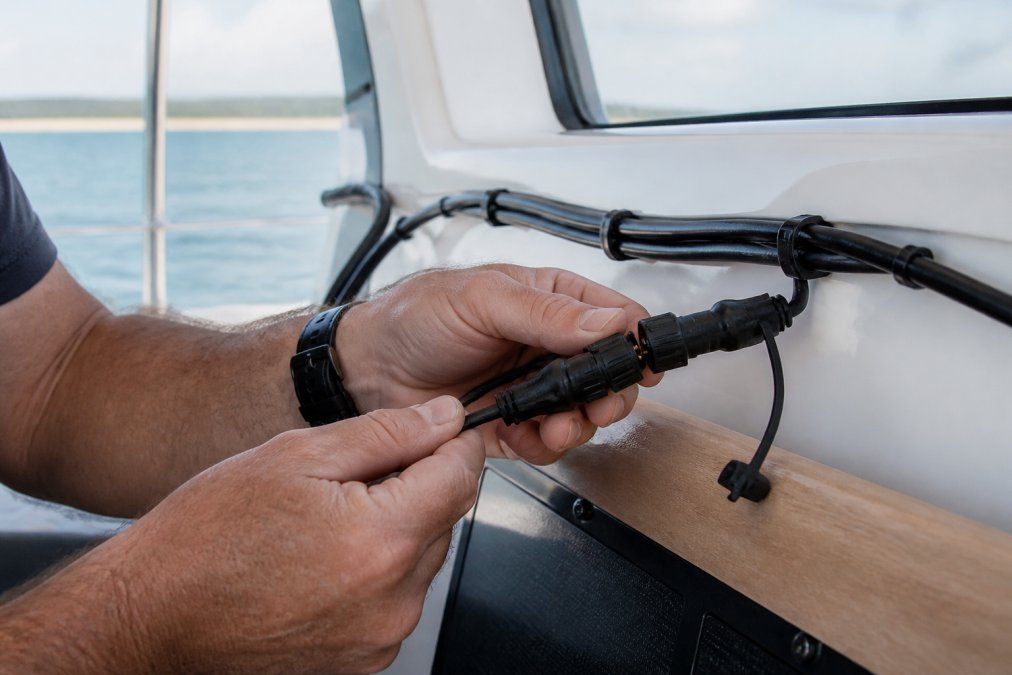
Proper termination is where most installation failures originate. RJ45 connectors must be crimped with a tool that applies consistent pressure across all eight pins. Hand-crimping or using a cheap crimper often leaves pins slightly loose, and saltwater corrosion will exploit that gap.
For NMEA 2000 Micro C connectors, use pre-terminated cables and connectors. Test every termination before sealing it up using a network cable tester for Ethernet runs or a multimeter for NMEA 2000 connections to verify continuity. A failed connection discovered during installation takes 30 minutes to fix; discovered mid-voyage it can strand you.
Waterproof Connectors and Corrosion Resistance
Waterproof connectors are the weak point in most marine installations. The cable itself might survive 10 years of saltwater exposure, but the connector corrodes in two seasons without maintenance.
Garmin and Raymarine use sealed metal connectors with gold-plated contacts. Gold resists corrosion far better than bare copper or nickel plating. The seals around the connector prevent saltwater from reaching the contact surfaces. Even with these protections, connectors in high-salt-spray environments need periodic inspection and light dielectric grease applied to the contact pins.
RJ45 connectors are inherently less sealed than proprietary marine connectors. If you use RJ45 connectors in a marine environment, invest in sealed RJ45 boots or covers that provide additional protection. Use stainless steel hardware for cable clips, fasteners, and cable trays.
Proprietary vs. Universal Marine Networking Standards
The marine electronics industry is fractured between proprietary systems and standards-based approaches. Garmin's NMEA 2000 and BlueNet, Raymarine's SeaTalkng, and B&G's network protocols are all proprietary, they work beautifully within their own ecosystems but require adapters to communicate with competitors' equipment.
Ethernet-based networking is moving toward standardization. Garmin BlueNet, Simrad NSE, and B&G's network systems all use standard Ethernet protocols underneath their proprietary interfaces. This means the physical cable infrastructure is becoming more universal. For new installations, standardized Ethernet offers better long-term flexibility. For existing systems, proprietary cables and connectors are proven and widely available.
Cable Maintenance and Troubleshooting Network Connectivity
Network failures on boats rarely happen suddenly. They develop gradually as corrosion creeps into connectors and moisture penetrates cable jackets. Preventive maintenance catches these failures before they strand you.
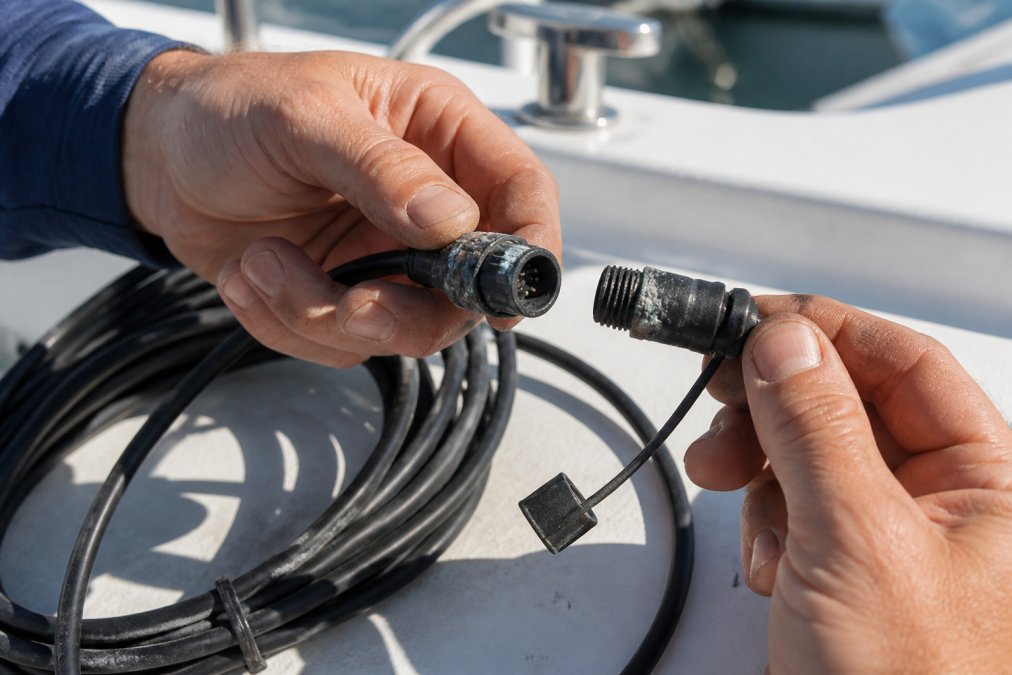
Inspect connectors twice a year, more frequently in high-salt-spray environments. Look for white or green corrosion on the connector pins or housing. If you see corrosion, disconnect the cable, clean the connector pins with a soft brush and electrical contact cleaner, and apply a thin coat of dielectric grease to protect the pins.
Check cable jackets for cracks, UV damage, or chafe marks where the cable rubs against a sharp corner. A small crack will allow saltwater to penetrate and corrode the internal conductors. Wrap damaged sections with marine-grade electrical tape as a temporary fix, then replace the cable within a few months.
Coil excess cable loosely and secure it with velcro cable ties, not zip ties. Test your network connectivity monthly. Most modern Garmin and Raymarine displays have a network diagnostic menu showing which devices are connected and signal strength. If a device suddenly shows as disconnected or signal strength drops, suspect a corroded connector.
Common troubleshooting: disconnect and reconnect the cable at both ends, check that the cable isn't pinched or kinked, verify you're using the correct cable type for your system, and confirm the device is powered on. Most "network failures" are actually loose connections or powered-off devices. If a cable fails completely, replace it rather than repair it. Splicing introduces a failure point that corrosion will exploit within two years.
The best marine electronics networking cables are the ones you install correctly and maintain consistently. Garmin's NMEA 2000 backbone cables offer proven reliability and broad compatibility within the Garmin ecosystem. The Digital Yacht starter kit removes guesswork for new installations. Garmin's BlueNet cables deliver the bandwidth modern sonar and radar systems demand. Raymarine's SeaTalkng system is a robust option for Raymarine and B&G equipment.
Charleston Yachting stocks all of these options because different boats have different needs. A 25-foot coastal cruiser running legacy Garmin electronics benefits from NMEA 2000 simplicity. A 50-foot fishing boat with high-resolution sonar and multiple radar systems needs BlueNet's bandwidth.
Choose your cable type based on your existing equipment and upgrade path. Install cables with attention to routing, shielding, and proper termination. Maintain connectors twice a year. Test your network monthly. Follow these steps and your marine electronics will communicate reliably for a decade or more.
Frequently Asked Questions
What is the difference between NMEA 2000 and marine Ethernet cables?
NMEA 2000 cables use proprietary connectors and carry both data and power through a single backbone system, making them ideal for older equipment and simple installations. Marine Ethernet cables use RJ45 connectors and offer higher data transfer speeds, supporting modern chartplotters, fishfinders, and radar systems. NMEA 2000 works well for basic navigation setups, while Ethernet handles the bandwidth demands of high-resolution sonar and real-time data sharing across multiple devices. Your choice depends on your existing equipment and future upgrade plans.
Can I use standard home Ethernet cables on a boat?
Standard home Ethernet cables are not recommended for marine use. Marine-grade cables feature enhanced shielding to resist EMI and RFI interference from engines and radios, UV-resistant jackets to withstand sun exposure, and corrosion-resistant connectors that survive salt spray and moisture. Home cables lack these protections and will degrade quickly in a marine environment, leading to signal loss and unreliable connectivity. Marine-grade cables like Garmin's BlueNet and RJ45 marine network cables are specifically designed to maintain signal integrity in harsh saltwater conditions.
Do I need shielded cables for marine electronics networking?
Yes, shielded cables are essential for marine electronics networking. Boats generate significant electromagnetic interference (EMI) from engines, alternators, VHF radios, and radar systems. Unshielded cables pick up this noise, causing data corruption, dropped signals, and intermittent connectivity issues. Shielded marine-grade cables like the Garmin NMEA 2000 backbone cables and BlueNet network cables protect your signal by surrounding conductors with a conductive layer that absorbs interference. This is especially critical if your chartplotter, autopilot, and fishfinder share the same network backbone.
How do I choose the right cable length for my marine network?
Measure the actual routing path from your power source to each device, adding 10-15% extra length for slack and future repositioning. For NMEA 2000 systems, Garmin offers backbone cables in 2M (6 feet), 4M (13 feet), and 6M (18 feet) lengths, allowing you to build a backbone that spans your boat's layout. For Ethernet installations, longer runs (over 50 feet) may experience voltage drop and signal degradation, so plan your network topology carefully. If you need to extend beyond standard lengths, use backbone extenders or network switches rather than daisy-chaining multiple long cables.
Are proprietary marine network cables worth the extra cost?
Proprietary marine cables like Garmin NMEA 2000 and Raymarine SeaTalkng systems cost more than universal alternatives, but they offer guaranteed compatibility, integrated power delivery, and optimized connectors for marine environments. If you're building a system around one manufacturer's ecosystem (Garmin, Raymarine, B&G), proprietary cables ensure reliable integration and future expandability. However, if you're mixing brands or upgrading an older system, universal marine-grade Ethernet cables with RJ45 connectors offer flexibility and cost savings while maintaining corrosion resistance and shielding standards.
This article was written using GrandRanker