

Best Marine Ethernet Switch for Boats: 2026 Guide

Table of Contents
- Marine Ethernet Switch Comparison Table
- What Is a Marine Ethernet Switch and Why Your Boat Needs One
- Waterproof Marine Ethernet Switch Options for Saltwater and Freshwater Vessels
- Digital Yacht NS8 Network Switch: Best for Maximum Port Expansion
- Marine Network Switch Compatibility Across Garmin, Raymarine, and Navico Systems
- Installation, Power Requirements, and Troubleshooting
- How to Choose the Right Switch for Your Boat
- Frequently Asked Questions
Last Updated: October 12, 2026
Marine Ethernet Switch Comparison Table
When selecting a marine ethernet switch for your boat, the choice depends on your vessel size, existing electronics brand, and network demands. Here's how the leading options stack up:
| Switch Model | Port Count | Data Speed | Price | Best For |
|---|---|---|---|---|
| Digital Yacht NS8 | 8 ports | Gigabit (1GB) | $219.99 | Maximum expansion, mixed brands |
| Garmin GMS 10 | 4 ports | 100 MB | $269.99 | Garmin systems, budget-conscious |
| Navico NEP-3 | 5 ports | Gigabit (1GB) | $384.99 | Simrad/Navico ecosystems |
| Raymarine RNS-5 | 5 ports | Gigabit (1GB) | $439.99 | Raymarine Axiom displays |
| Raymarine RNS-8 | 8 ports | Gigabit (1GB) | $1,099.99 | Enterprise-grade Raymarine systems |
What Is a Marine Ethernet Switch and Why Your Boat Needs One
A marine ethernet switch is a network device that expands wired Ethernet connectivity on your boat by distributing data signals from a single router connection across multiple ports. It functions as the backbone of your vessel's networked electronics, allowing fish finders, chartplotters, radar units, IP cameras, and other compatible devices to communicate simultaneously over a stable, high-speed wired connection.

Most modern boats rely on wireless routers for internet connectivity. However, wired Ethernet remains the fastest and most reliable option for data-intensive applications like streaming video feeds, real-time sonar data sharing, and simultaneous multi-device chart updates. When your boat's navigation system, weather monitoring, and security cameras all compete for bandwidth, a dedicated marine ethernet switch ensures each device gets the connection stability it needs.
Here's the practical reality: a single router connection limits how many devices you can reliably connect. Add a second chartplotter, integrate a thermal camera, and suddenly your wireless network struggles. A marine ethernet switch solves this by adding physical Ethernet ports throughout your cabin and helm, eliminating the bottleneck.
Waterproof Marine Ethernet Switch Options for Saltwater and Freshwater Vessels
The marine environment demands switches built to withstand moisture, salt spray, and temperature swings. Not all network switches are created equal when it comes to corrosion resistance and waterproofing.
Saltwater vessels face the harshest conditions. Switches must feature sealed connectors, corrosion-resistant materials, and strong construction rated for continuous exposure. Freshwater boats have slightly easier requirements, but protection remains critical during rain, spray, and high humidity in enclosed cabins.
Look for switches with IPX6 or IPX7 waterproof ratings. IPX6 means the device resists powerful water jets from any direction. IPX7 goes further, allowing temporary submersion. Both standards are common in quality marine switches. The Raymarine RNS-5 and RNS-8 explicitly carry IPX6 and IPX7 construction, making them excellent choices for exposed helm stations or spray-prone locations.

Power supply design matters too. Dual redundancy in power circuits, like the Digital Yacht NS8 features, ensures your network stays up even if one power line fails. This is critical on extended voyages where network reliability directly impacts navigation safety and communication.
Connection types vary significantly. Standard RJ45 Ethernet ports require careful cable management and sealed covers for unused ports. RayNet connectors, found on Raymarine switches, are specifically engineered for marine use with integrated waterproofing. This eliminates one common failure point: water seeping into standard Ethernet jacks.
Digital Yacht NS8 Network Switch: Best for Maximum Port Expansion
The Digital Yacht NS8 stands out as the most versatile marine ethernet switch for boats requiring extensive network expansion across mixed-brand electronics. With eight Gigabit ports, it delivers the port capacity of enterprise-grade switches at a fraction of the cost.
The NS8's defining feature is its compatibility. It works with Garmin, Raymarine, Navico, and non-marine Ethernet devices. This flexibility matters if your boat runs a hybrid setup, a Garmin chartplotter paired with a Raymarine radar and third-party IP cameras. The NS8 connects them all.
Its dual redundancy power supply design adds reliability. The switch continues operating even if one power connection fails, critical for vessels where network downtime affects navigation. It supports 12V, 24V, and 48V DC power, accommodating various boat electrical architectures. Simply wire it directly to your battery bank, no external power adapter required.
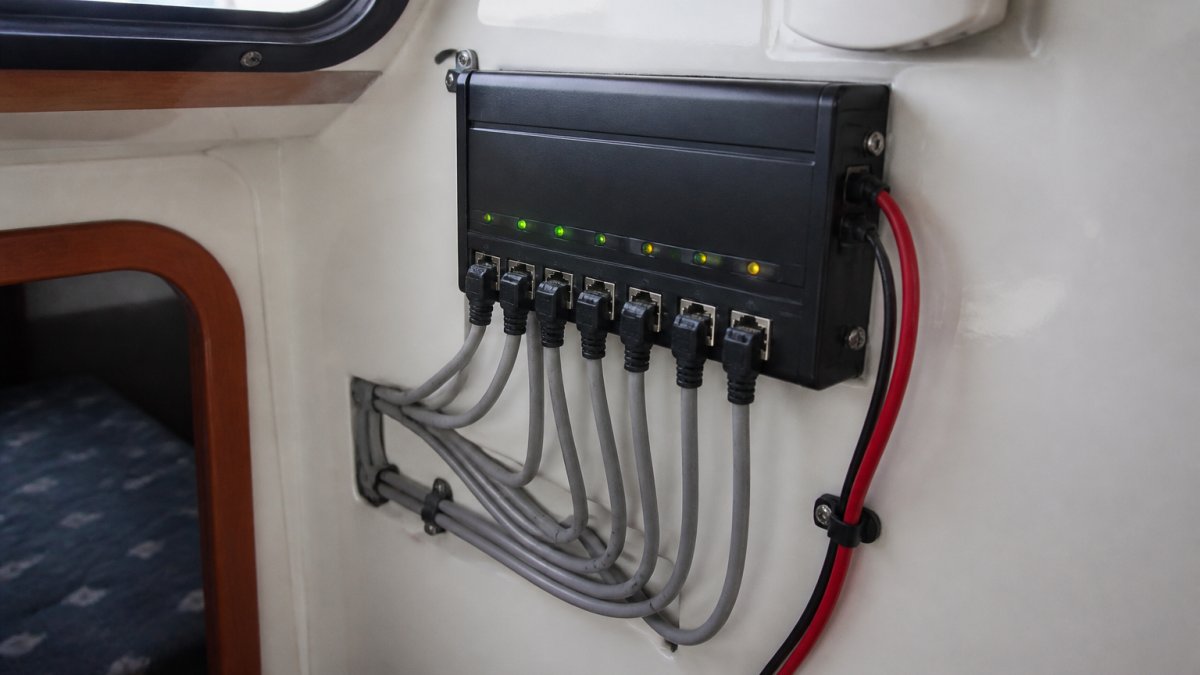
Installation is straightforward. Connect one RJ45 port to your router's LAN output using standard Cat 5 or Cat 6 cable. Wire the remaining seven ports throughout your boat to displays, sonar modules, and cameras. The NS8 includes a DIN rail mounting bracket and 100mm rail for secure cabin installation. LED status indicators show power and link status on each port, making troubleshooting simple.
At $219.99, the NS8 is suitable for boats needing to connect four or more wired devices. It's the switch we recommend for DIY boat owners upgrading older systems where equipment comes from different manufacturers.
Marine Network Switch Compatibility Across Garmin, Raymarine, and Navico Systems
Compatibility is where boat owners encounter the most frustration. Each major electronics manufacturer, Garmin, Raymarine, and Navico, uses slightly different networking approaches, and incompatible switches can render expensive equipment unusable together.
Garmin systems use the Garmin Marine Network protocol. The Garmin GMS 10 is purpose-built for Garmin chartplotters and sensors. It operates at 100 MB speed but integrates with Garmin displays. If your boat runs exclusively Garmin equipment, the GMS 10 at $269.99 is the straightforward choice. It's plug-and-play with automatic device detection, no configuration required.
Raymarine systems use RayNet, a proprietary high-speed Ethernet connector. The RNS-5 (5 ports, $439.99) and RNS-8 (8 ports, $1,099.99) are designed specifically for Raymarine Axiom displays and compatible accessories like sonar modules, radar units, and FLIR thermal cameras. RayNet connectors are waterproof by design, eliminating exposed Ethernet vulnerabilities. Two RNS-5 switches can be daisy-chained for larger systems, and up to eight RNS-8 units can be linked together for enterprise-scale networks.
Navico offers the NEP-3, a five-port Gigabit switch at $384.99. It's designed for Simrad displays and integrates with the full Simrad product ecosystem. The NEP-3 is notably compact, roughly half the size of previous models, making it ideal for tight cabin spaces.
Here's the critical compatibility rule: Garmin, Raymarine, and Navico switches are not interchangeable. A Raymarine RNS-5 won't work with Garmin displays. A Navico NEP-3 requires Simrad equipment. If your boat has mixed-brand electronics, the Digital Yacht NS8 is an option because it uses standard RJ45 Ethernet ports compatible with any device that accepts Ethernet input.
Installation, Power Requirements, and Troubleshooting
Installing a marine ethernet switch requires planning but involves no specialized skills. Most boat owners complete the job in under an hour.
Digital Yacht NS8 Network Switch - 8-Port, 1GB [ZDIGNS8] →
Power wiring comes first. All switches require 12V DC power from your boat's main battery bank or a dedicated circuit. Run power cable (typically 16-18 gauge) directly from your battery's positive and negative terminals to the switch's power input.
Network cabling follows. Run one Ethernet cable from your router's LAN port to the switch's input port. Then run cables from the switch's remaining ports to each device you're connecting. Standard Cat 5e cable works fine for most installations.
Physical mounting matters. Mount the switch in a protected location, inside the cabin, not on deck. Use the provided DIN rail bracket or secure it with stainless steel fasteners. Ensure good ventilation; switches generate minimal heat but benefit from airflow.
Power requirements vary by model. The Digital Yacht NS8 draws minimal current (under 1 amp at 12V), making it suitable for boats with limited electrical capacity. Raymarine switches similarly draw light loads.
Troubleshooting common issues:
If devices don't appear on the network, check LED indicators on the switch. Green lights indicate active connections. Yellow indicates data activity. No lights on a port means either the cable is disconnected or the connected device is powered off.
If connections drop intermittently, the problem is usually power-related. Check that battery voltage stays above 11V under load. Loose battery terminals or corroded connections cause voltage sag that makes switches cut out.
If you're connecting devices from different manufacturers and they won't communicate, you may need a universal switch like the Digital Yacht NS8 instead of a manufacturer-specific model. Manufacturer switches enforce ecosystem boundaries, by design.
How to Choose the Right Switch for Your Boat
Selecting the right marine ethernet switch requires answering three questions: How many devices do you need to connect? What brands are they? And what's your budget?
Port count is the first filter. Count every device that needs wired Ethernet: chartplotters, radar units, sonar modules, IP cameras, thermal cameras, and any other networked equipment. Add one port for the router connection. For five to seven devices, the Navico NEP-3 or Raymarine RNS-5 are appropriate.

Brand ecosystem is the second filter. If your boat runs exclusively Garmin, the GMS 10 at $269.99 is the obvious choice, it's optimized for that system and costs less than universal alternatives.
Mixed-brand systems change the calculus entirely. If your boat has a Garmin chartplotter, Raymarine radar, and a third-party IP camera, manufacturer-specific switches won't work. The Digital Yacht NS8 becomes essential because it accepts any device with an Ethernet port, regardless of brand.
Budget and future-proofing matter. The Garmin GMS 10 is the cheapest entry point at $269.99, but it locks you into Garmin. The Digital Yacht NS8 at $219.99 is actually cheaper and offers more flexibility.
Upgrading your boat's network infrastructure pays dividends every time you cast off. A reliable wired Ethernet backbone eliminates the connection dropouts, slow data transfers, and compatibility headaches that plague wireless-only setups.
At Charleston Yachting, we stock all five of these switches and can help you match the right option to your specific vessel and electronics. Our same-day shipping means you can order today and be installing tomorrow. Shop our full selection of marine network switches and get your boat connected right, Shop All.
Frequently Asked Questions
What is the best Ethernet switch for a boat?
The best marine Ethernet switch depends on your system and port needs. The Digital Yacht NS8 ($219.99) offers eight ports and dual power redundancy for general boating. The Raymarine RNS-8 ($1,099.99) adds Power-Over-Ethernet for cameras and keypads if you run Raymarine equipment. The Navico NEP-3 ($384.99) is compact and ideal for Simrad systems with five gigabit ports. Match your switch to your existing chartplotter brand for seamless compatibility.
Do I need a marine-grade Ethernet switch on a boat?
Yes. Standard network switches corrode quickly in saltwater and freshwater marine environments. Marine-grade switches feature waterproof connectors, sealed port covers, and corrosion-resistant construction. All options available here, including the Digital Yacht NS8, Raymarine RNS-5 and RNS-8, Navico NEP-3, and Garmin GMS 10, are designed to withstand moisture, salt spray, and temperature swings without failing.
How many ports should a marine Ethernet switch have?
Port count depends on your connected devices. A five-port switch (Navico NEP-3, Raymarine RNS-5) handles most recreational boats with a chartplotter, radar, sonar, and one or two cameras. Eight-port switches (Digital Yacht NS8, Raymarine RNS-8) suit larger vessels or those adding future devices like IP cameras, remote keypads, or additional displays. The Garmin GMS 10 supports multiple displays and sensors on a single network.
Are marine Ethernet switches compatible with Garmin and B&G equipment?
Compatibility varies by brand. The Garmin GMS 10 ($269.99) works exclusively with Garmin chartplotters and sensors. The Navico NEP-3 ($384.99) integrates with Simrad displays and accessories. Raymarine switches (RNS-5 at $439.99 and RNS-8 at $1,099.99) use proprietary RayNet connectors for Axiom displays and Raymarine radar. The Digital Yacht NS8 ($219.99) uses standard RJ45 Ethernet and works with any compatible device. Check your existing equipment before purchasing.
What should I look for in a waterproof marine Ethernet switch?
Priority features include IPX6/IPX7 waterproof ratings, sealed port covers for unused connections, corrosion-resistant connectors, and DC power operation (12V, 24V, or 48V). Gigabit Ethernet support ensures fast data transfer for sonar, radar, and video. LED status indicators help diagnose connection issues. Compact designs fit tight cabin spaces. All switches here meet these standards, but the Raymarine RNS-8 adds Power-Over-Ethernet for powering accessories directly.